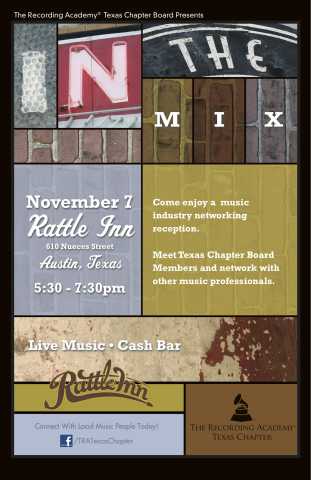
You are cordially invited to
In the Mix: Austin
Come enjoy a music industry networking reception.
Hosted by Recording Academy® Texas Chapter Board Members
Wednesday November 7th
5:30 - 7:30pm
Rattle Inn
610 Nueces St, Austin, TX 78701
You are cordially invited to
Come enjoy a music industry networking reception.
Hosted by Recording Academy® Texas Chapter Board Members
Wednesday November 7th
5:30 - 7:30pm
Rattle Inn
610 Nueces St, Austin, TX 78701
This weekend produced some interesting and picturesque weather. I think it made some quite interesting time-lapses. This first video is of Friday evning as the front was coming through and it was just starting to rain.
This second video is from Saturday night and shows a colorful sunset.

There are several music databases on the web that you can go browse and look and information related to music. Some include the Gracenote CDDB, The All Music Guide, FreeDB and MusicBrainz. What are the differences between them? I've posted about the CDDB and All Music Guide before. Both of these databases are used frequently by the musicians I work with and around every day. You can read more about them by clicking these links.

The Recording Academy has started a new campaign to enhance fans' discovery of new music by ensuring all music creators are credited for their work on digitally released recordings. This means you can look at who the producer or mix engineer on a particular recording on your iPod (or other player) right from its screen.

"So, how can I make money with my music that ends up on YouTube?" a client asked me last week. I promptly told him I had no idea, but it probably had to do with getting tens of thousands of hits and then advertisers deciding they wanted to put ads on your chanel. . . I thought for a little whlie longer and decided it would be a great blog post because I'm sure there are many independant musicians that would love to know.

Nick Landis is now a Certified Mastered For iTunes Mastering Engineer.
It seems that every day I hear of a new way to get your songs to the digital marketplace, so it's about time for an update on Digital Distribution methods for your music. In a more strict sense of the term, digital distribution relates not just to music but eBooks, movies, ringtones, photography, software programs and apps among other things. There are a lot of stores. . .

Mastered for iTunes made a splash a few months ago when Apple made the announcement that they would accept higher resolution masters for AAC (like MP3) release. I was highly skeptical that it would make the files sound better.